
What are the Pros and Cons of Setting Up an Online Course in Squarespace:

It’s here! in July 2023 Squarespace launched it’s Courses product, making it super-easy to sell a digital course that actually looks like an online course, on Squarespace.
They are really putting it up to Podia, Teachable, Thinkific and the others now as there is no reason for Squarespacers to go to these third-party Learning Management Systems any more to host their courses.
Courses is now available on all Squarespace 7.1 sites and the set-up is very straightforward. Here’s a video to show how it works!
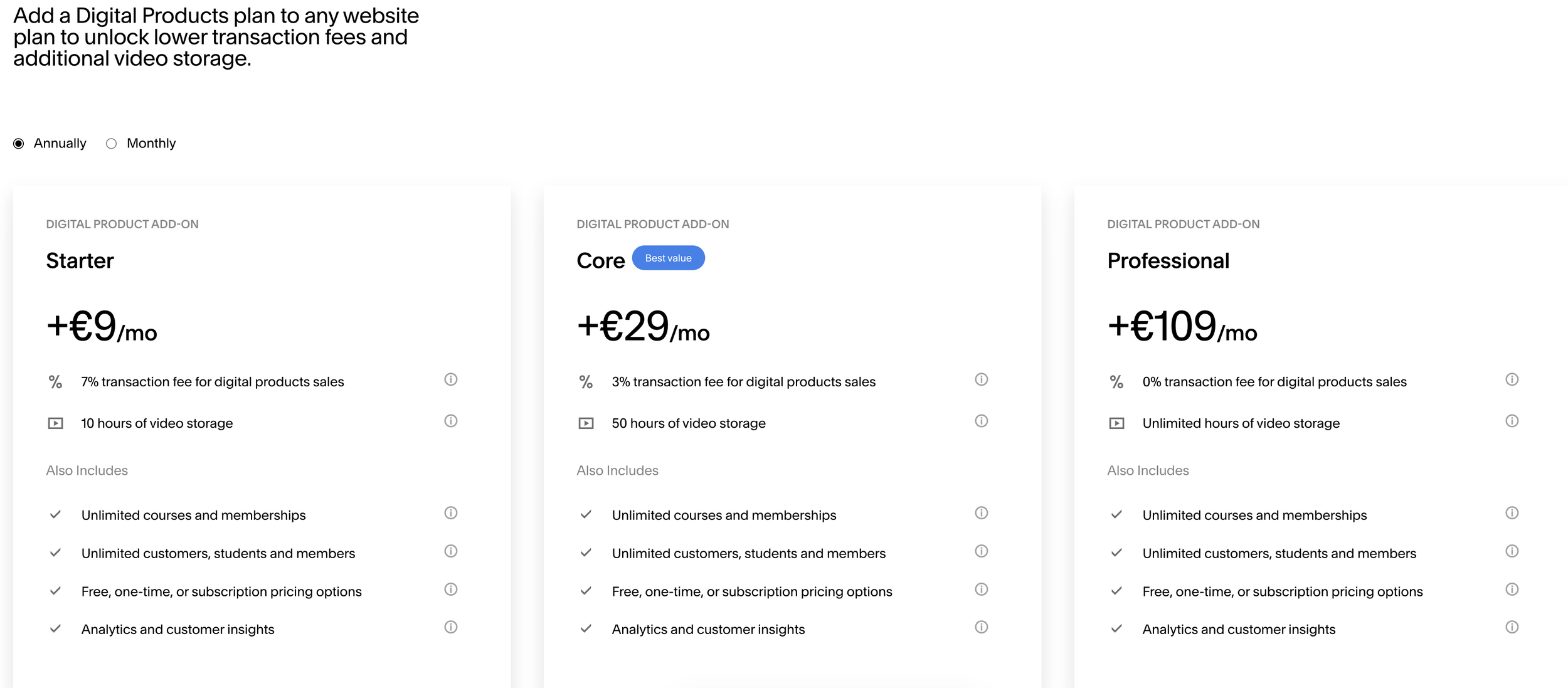
What does it cost to use Squarespace Courses?
Here’s a snapshot of the pricing model. I think the Core plan will be very popular. You can find out more here.
As we could expect from Squarespace, Courses include beautifully designed layouts that can be fully customised to match your brand. They offer an easy way to organise content into lessons and chapters, in addition to supplementary lesson content such as text, images, and downloadable resources. Powered by the Fluid Engine, the Courses templates are fully customisable, and integrated into the Squarespace platform. They come with a very slick editing experience, built-in commerce functionality, marketing tools, robust analytics, and more.
Here are the pros of using Squarespace for your online course:
A new way to turn knowledge into income: Design, promote, and sell professional, multimedia courses with beautiful layouts and capabilities for uploading and hosting video and supplementary content
A great student experience: Engage audiences with lessons and chapters, as well as a progress tracker which helps the student know where the are in the course. Students can enroll at any time, or can be signed up in cohorts that take the course at the same time.
Flexible fee structure: With Squarespace Courses, you can sell courses individually, bundled together, or as part of a package with other content like memberships or video. You simply need to choose the right fee structure, whether that’s once-off payments, instalments, or recurring subscriptions.
Access to Squarespace’s all-in-one platform:
Create content, accept payments, monitor analytics, and leverage marketing tools to grow your business all in one place. These include Blogging and Podcasting: The platform makes adding a blog or podcast to your Squarespace site easy, allowing you to offer free content to grow your audience.
Acuity Scheduling: You can use Squarespace’s scheduling tool to easily manage classes, appointments, and other events.
eCommerce: You can create a full-fledged online store to sell physical products.
Email Marketing: Squarespace’s Email Campaigns is an in-built tool for collecting leads and sending email newsletters.
Regarding content for your digital courses on Squarepace, you can add text, videos, PDFs, and other downloadable resources. Squarespace even handles video hosting, so you don’t have to worry about finding a separate video host.
One of the things I like about the Courses functionality on Squarespace is the course editor which is very flexible, using Fluid Engine, allowing you to add content to your lessons and design them in any way you like.
The lesson editor uses Squarespace’s page builder so that you can add content blocks with text, images, videos, and other media elements. You can also add pre-designed sections to your page, making it easy to build lessons quickly.
Courses joins Squarespace’s growing toolkit for entrepreneurs to monetise their content. They are also launching additional improvements to the ways site-owners can set up paywalls and pricing plans on their websites, making it easier than ever to sell access to content.
As long as you are on a Business or Commerce Squarespace plan, you can sell courses and other digital assets. Or, customers on any plan can purchase the all-new Digital Products add-on to unlock lower transaction fees and additional video storage space, starting at $9/month.
The Cons of using Squarespace to host your online course might be considered significant, depending on your business model and digital course structure:
One big drawback is that Squarespace’s course builder doesn’t have a bulk uploader, so you have to create lessons individually.
Learning and Engagement
Squarespace is a disappointment in this area. Apart from students being able to track their progress, it doesn’t have any learning and engagement features.
It doesn’t support native quizzes or assignments.
You can’t drip content or set prerequisites for the course. You can, however, release lessons on specific dates.
It doesn’t support a community builder or lesson comments.
You can’t create and send certificates of completion.
There’s no real engagement between the instructor and the students; it’s not an interactive learning experience compared to some of the other LMS on the market.
Content Delivery
Another essential aspect of a course platform is the learning experience and how your content appears to students.
While Squarespace’s lesson pages look elegant, the course player isn’t well designed for the student experience. The content area takes up the whole screen width and has no visible sidebar navigation. There is a sidebar that pops out when you click on it, but you have to do that first.
There’s no Squarespace Course App
This means students have to log on to the course using their browser. Kajabi on the other hand has it’s own app for easier access to course content from a mobile phone.
Limit on Video Hosting
Unlike specialized course platforms like Kajabi, Squarespace doesn’t offer unlimited video hosting on all plans.
The entry-level plan ($12/month) includes only ten hours of video storage, while the Core plan ($44/month) comes with 50 hours.
Only the Professional plan ($149/month) offers unlimited video hosting. In this case, you’ll be paying $172/month.
Lack of Course Reporting Tools
While Squarespace has built-in analytics for website page views and sales, it doesn’t include reporting features for tracking your course stats.
This means you won’t be able to generate reports for understanding student progress, completion, or video engagement.
It’s even missing the most basic course reporting feature which would allow you to track which lessons and chapters students have completed.
Poorly designed checkout
Surprisingly, Squarespace’s checkout process for selling digital products isn’t optimised for easy conversions.
When a visitor purchases a course, they first need to create an account on your Squarespace website before finally being able to make the payment.
This creates unnecessary friction, leading to lower conversions. It would have made more sense to move the account creation step after the payment has been made.
How does Squarespace Courses compare to Kajabi?
To be honest there’s no comparison really, given the marketing horsepower that comes with Kajabi. Kajabi allows you to create sales funnels, set up email sequences, run webinars, host a blog and your podcast, as well as offering an affiliate program.
But, if you are an existing Squarespace uses looking to sell simple video courses or include them in your membership site, it might be just what you are looking for.
